July 18, 2023
How to photograph spare parts: a 10-step guide for 2026
Learn how to photograph spare parts step by step: part numbers, lighting for reflective metal, scale, 360° spins, white backgrounds, and bulk publishing.

AI-generated product images are fast and cheap, but they can drift from the real product. Here is where generated images lose product truth, what makes AI in product photography trustworthy, and how Orbitvu uses AI around the real product, never instead of it.
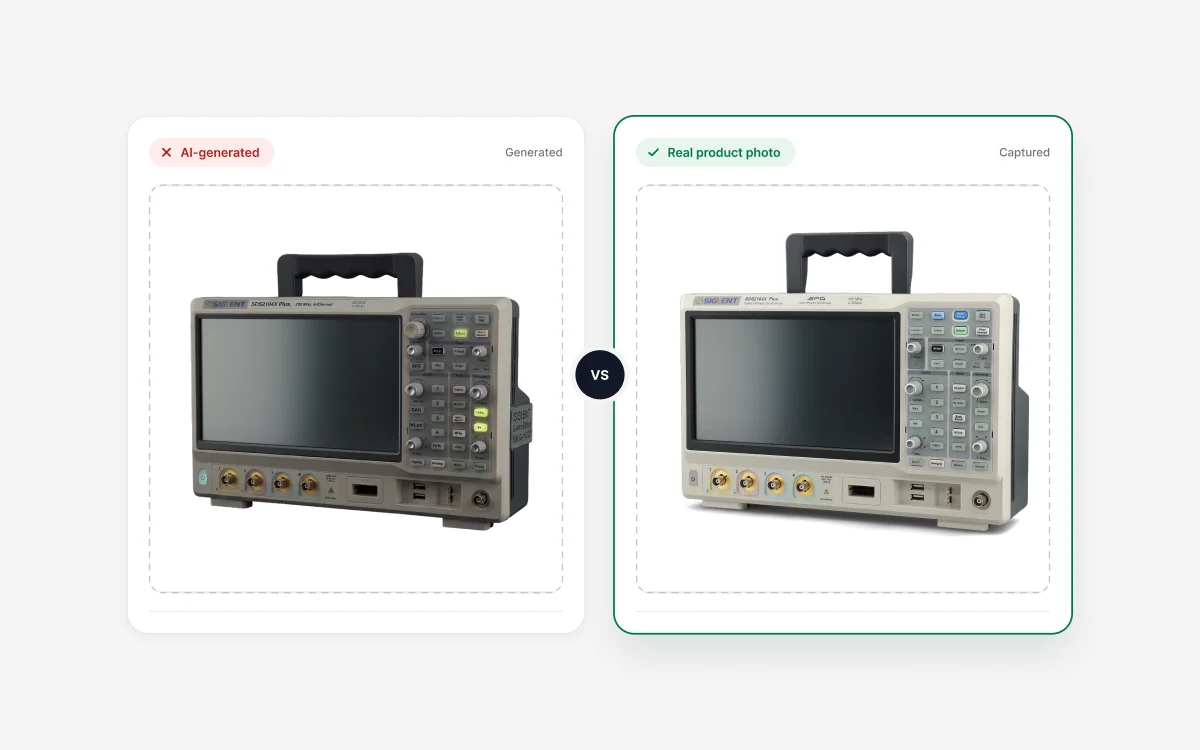
Table of contents
AI is changing product photography fast. Some tools generate product images from scratch - no camera, no real product, just a prompt or a reference photo, and a finished image a few seconds later. Others work on photos of the real product, handling the lighting, the background, the retouching, and the data.
Both get called "AI product photography". They aren't the same thing. And once an image has to stand in for the real product - on a product page, in a parts catalog, in a museum record - one question matters more than any other: does it still show the real thing?
This article looks at where AI-generated images lose product truth, what makes AI in product photography trustworthy, and how Orbitvu uses AI where it matters - around the real product, never instead of it.
Explore the possibilities of AI-driven workflow
Search for AI product photography, and most results are roundups of image generators. Upload one photo and the tool builds new backgrounds, new lighting, even whole lifestyle scenes, in minutes.
For early concepts, mood boards, and some ad creative, that works well. Our test of generative AI for lifestyle perfume shots shows what these tools can do today. It's fast, it's cheap, and nobody expects a mood board to be accurate.
The trouble starts when a generated image has to represent the real product someone's about to buy, inspect, or catalog. That's a different job, and it needs a different kind of AI.
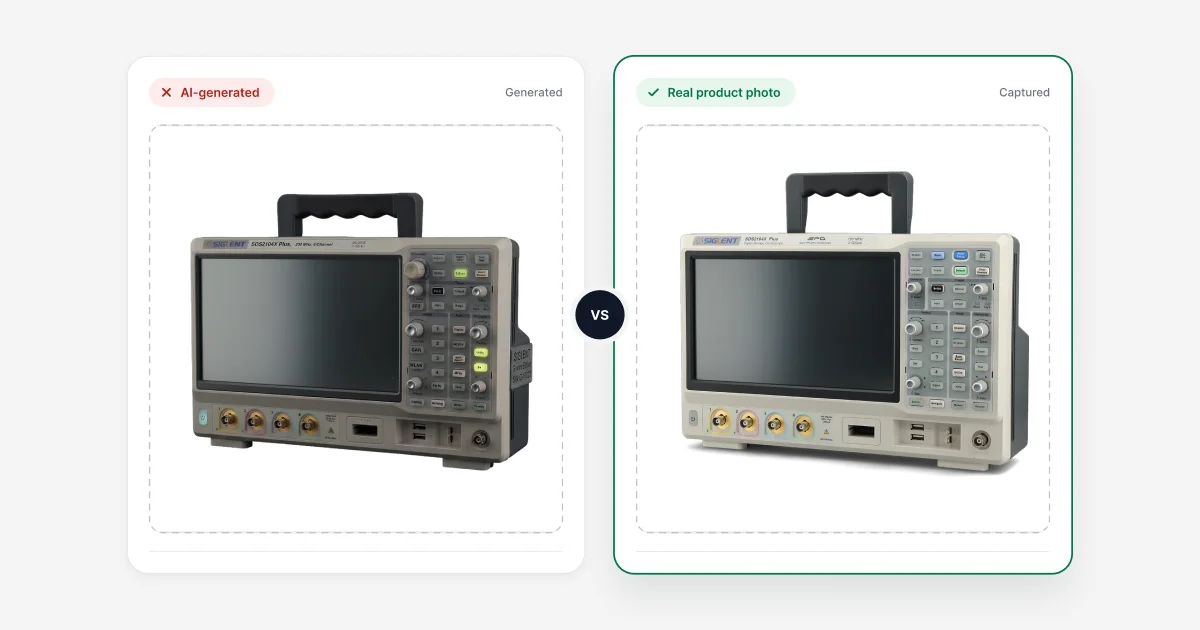
Details drift. A model doesn't know your product - it predicts what the product probably looks like. So color, proportion, material, and fine texture can shift without anyone noticing. A bag comes out a shade too dark. A seam appears that was never there. A label picks up letters that don't exist.
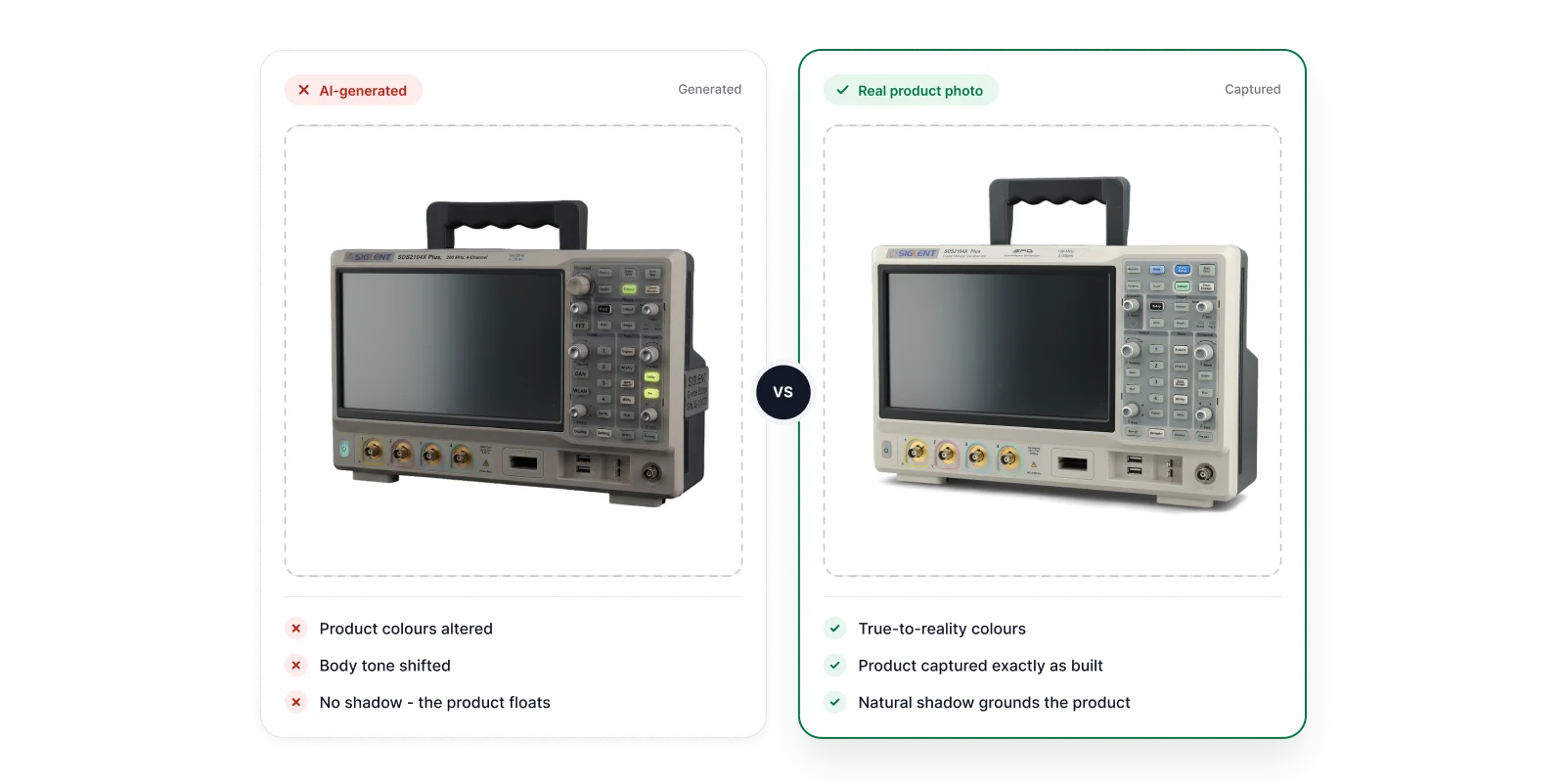
On a social post, few people check that closely. On a product page, what counts is what the customer receives. If the color is off or the fit looks different in real life, that's a return, not a sale. Fashion feels it hardest - when we compared virtual try-ons with real on-model content, the gap showed up in exactly these details: fabric, drape, and texture.
For industrial teams, the stakes are different but just as real. A part photo that "looks right" but shows the wrong connector, finish, or marking is worse than no photo at all. It goes into a catalog, a QA record, or a spare-parts system, and people trust it.
Marketplaces and standards bodies expect the same thing: images that accurately show the item for sale. GS1 image standards spell out how product images should represent the product. Marketplace rules on synthetic imagery differ by platform and keep changing, so check each platform's current image requirements before you publish generated images to a listing.
Since August 2, 2026, Article 50 of the EU AI Act requires a disclosure label on AI-generated or AI-manipulated images that could pass as real. Routine editing of a real photographed product - color correction, cropping, background cleanup - is generally treated as exempt. A fully AI-generated product image isn't.
Breaking Article 50 can cost up to €15 million or 3% of global annual turnover, whichever is higher, with lower caps for smaller companies (Article 99). The rule applies to any business showing images to people in the EU, wherever it's based. We cover the details, including the transition period for AI providers, in The EU AI Act and product photography: what changes in 2026.
None of this makes AI generation bad. It's built for certain jobs - and showing the real product isn't one of them.
"Trusted AI" gets said a lot. In product photography, it comes down to four practical tests:
If an AI tool passes all four, it's helping you show the real product. If it fails any of them, you're publishing a guess.
Orbitvu captures the real product in a controlled studio, then uses AI for specific jobs around it: setting up the shot, processing the image, and capturing product data. Each tool has one job. None of them generate the product. (For the business case, see the top 5 benefits of implementing AI in product photography.)
AI Photo Assistant works before the photo is taken, not after. It looks at the type, shape, and texture of the product and suggests lighting setups tailored to it. You pick the one you want, fine-tune it if needed, and shoot. The final choice is yours.
Why it matters for trust: the surest way to get true color and detail is to capture them correctly in the first place. Less fixing afterwards means less room for the image to drift from the product.
AI Masking removes the background from the captured image automatically. It separates the product from its surroundings - it doesn't redraw the product. What you get is the real photo on a clean background, ready for a product page or a marketplace listing.
Under the EU AI Act, background removal on a real photographed product is generally treated as routine editing. The gray areas, such as added shadows or reflections, are covered in the EU AI Act guide linked above.
AI Retoucher removes reflections, dust, and small blemishes from the photo. It cleans up the image, not the product - shape, material, and color stay as captured, and you check the result against the real item before it goes out.
A true-to-reality image is only half of a listing. If the product name, part number, or ingredients are typed in wrong, the listing is still wrong. AI OCR reads the text on the product's label or packaging - brand and product names, part numbers, barcodes, descriptions - and matches it to your product attributes. The data can travel with the image as embedded metadata and drive how files are named, so the photo and its data come from the same real product, in one pass.
Put together, this covers the whole path from capture to publish in one workflow - see what end-to-end product photography automation looks like. Real product in. Publish-ready, true-to-reality images and data out.
Product pages are where the buying decision happens. A shopper sees a handful of images and decides. If what arrives doesn't match, trust goes with it. That holds whether you sell a few SKUs or run a catalog of thousands, and consistency across the catalog matters as much as any single shot.
Images and data feed spare-parts catalogs, ERP and PIM systems, and QA records. Here the priority is audit-grade consistency: same setup, same angles, same result on every part. Alphashot XL G2 MDC captures a product's images and its label data together, so the record starts complete.
A digitized collection is a record. It has to show the object as it is, in accurate color, with minimal intervention. That's why museum digitization projects start with controlled capture, not generated imagery.
In every case, a real image protects the same thing: the confidence that what people see is what's actually there.
Images created by an AI model from a prompt or a reference photo. No camera captures the actual product. Generated, not captured.
It depends on what the AI does. AI that works on a real photo - setting up the lighting, removing the background, retouching, reading label data - can be trusted, as long as it doesn't add product detail and a person reviews the result. AI that generates the product itself can drift from the real thing.
Not always. Because the image is predicted rather than photographed, color, proportion, material, and small details can drift from the real product. How close it stays depends on the tool, the prompt, and how carefully someone checks the result against the actual item.
An AI-generated image is created by a model. A real product photo is captured with a camera of the actual item. AI can still help with a real photo - lighting, background removal, retouching - and it's still a photo of the real product.
Fully AI-generated images that could pass as real do. Routine editing of a real photographed product - color correction, cropping, background cleanup - is generally treated as exempt. There are gray areas, such as added shadows or AI-generated backgrounds, so check the guidance for your specific case.
Rules vary by platform and keep changing. Most marketplaces expect images to accurately show the item for sale. Check each platform's current image requirements before using generated images in a listing.
Real product capture, consistent lighting, accurate color and detail, and AI that assists the process instead of replacing the product. Our buyer's guide to product photography systems goes through it point by point.
No. Orbitvu captures the real product and uses AI for specific jobs around it: lighting setup, background removal, retouching, and label data extraction.
Trusted product content starts with a real product. AI has real work to do around it - setting up the shot, cleaning the background, reading the label. The product itself should never be a guess.
Real products. Trusted content at scale.
Want to see where AI does its job in Orbitvu's workflow? See AI in Orbitvu →
July 18, 2023
Learn how to photograph spare parts step by step: part numbers, lighting for reflective metal, scale, 360° spins, white backgrounds, and bulk publishing.
June 10, 2021
What a packshot is, where it's used, and how to shoot one - camera settings, lighting, angles, tricky packaging, and the image specs marketplaces ask for.
May 24, 2021
Learn how to photograph models step by step: planning, posing, lighting, equipment, and post-production, for lookbook and e-commerce shoots.